Automated bank reconciliation inside Pennylane
Every day, Sanso automatically reconciles the payments and invoices inside your Pennylane account, including what native reconciliation leaves aside: foreign currencies, grouped payments, marketplace payouts.
 Book a Call →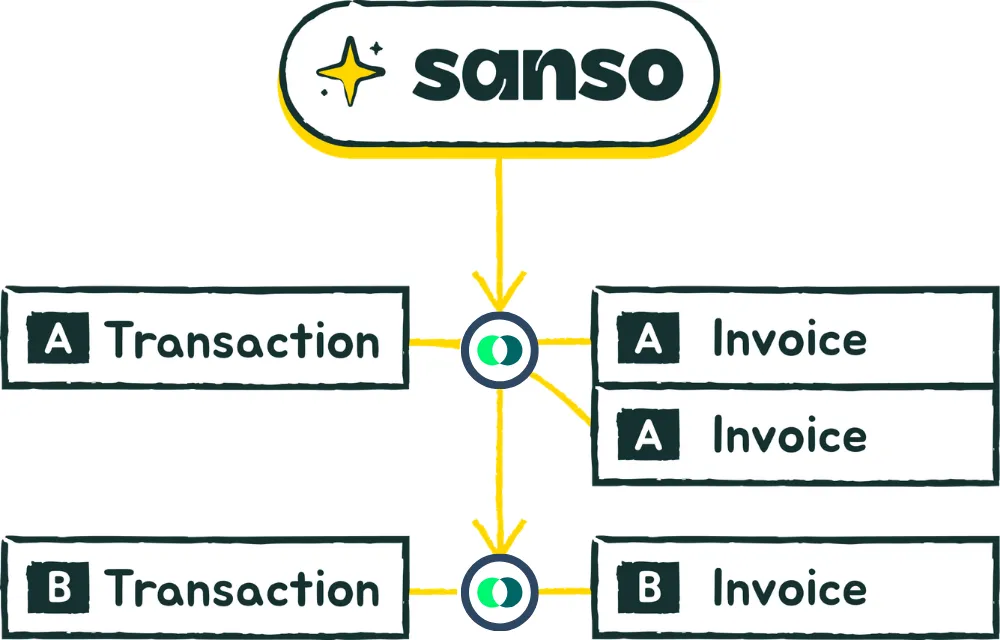
Trusted by:







Doesn't Pennylane already do bank reconciliation?
Pennylane works by suggestion. From the supplier, the label, the date and the amount, it points at the invoice that probably goes with a transaction. A setting even lets you approve those suggestions automatically, provided the invoice and the transaction amounts are strictly identical.
And a suggestion still has to exist. As soon as the amount paid does not match the amount invoiced, nothing is offered at all, neither suggested nor approved. A foreign-currency invoice, one transfer settling several invoices, a marketplace payout: the invoice has to be found by hand.
| Case | Native Pennylane reconciliation | With Sanso inside Pennylane |
|---|---|---|
| One invoice, one payment, same amount | Native Pennylane reconciliation Reconciled automatically if the setting is on and the amounts are strictly identical | With Sanso inside Pennylane Reconciled automatically |
| Foreign-currency invoice | Native Pennylane reconciliation No suggestion, the amount paid does not match the amount invoiced. Invoice to be found by hand, then the difference confirmed | With Sanso inside Pennylane Invoice found and reconciled automatically, foreign exchange gain or loss posted, invoice settled |
| One payment for several invoices | Native Pennylane reconciliation No suggestion, requires finding and linking the invoices one by one | With Sanso inside Pennylane Invoices identified automatically and reconciled |
| One invoice paid in instalments | Native Pennylane reconciliation No suggestion, requires finding and linking the invoice to each payment, one by one | With Sanso inside Pennylane Payments identified and reconciled against the invoice |
| Grouped marketplace payout | Native Pennylane reconciliation No detail in the bank statement, no fees and no refunds | With Sanso inside Pennylane Automated identification and reconciliation of the invoices, credit notes and fees tied to the payout |
Comparison established in September 2026, based on Pennylane public documentation: automatic approval, reconciliation suggestions, foreign exchange differences, multiple reconciliations, automated flows. Pennylane's help centre is in French.
Some flows reconcile on their own inside Pennylane, without Sanso: Stripe Billing and GoCardless collections, supplier invoices paid from Pennylane or Qonto, and invoices carrying the unique reference generated by Pennylane.
Sanso is an official Pennylane partner

Up and running in minutes. Daily reconciliation.
Fifteen minutes to see what your Pennylane account leaves aside today.
How do you switch Sanso on inside Pennylane?
One access to generate in Pennylane, one rhythm to choose. Everything else happens inside your account.
-
You generate the access in Pennylane
From your own account, in a few clicks. Nothing to install, nothing to deploy.
-
You choose the rhythm
That is the only setting. By default, Sanso reconciles your account once a day.
-
Sanso works inside your account
Reconciliation and matching are written straight into Pennylane. All that is left for you is to see the work already done in your Pennylane account.
When there is any doubt, nothing is reconciled by force. The case waits for a human to look at it.
Sanso works with every Pennylane plan.
What daily Pennylane reconciliation changes
-

An up-to-date view of client payments
Automated reconciliation means that at any moment you have an up-to-date view of the client invoices that are overdue. That is what lets a reminder reach only the clients who are genuinely late.
See invoice collection -
Never pay the same invoice twice
You have an up-to-date view of the supplier invoices still to pay, and of those already paid.
-

A close that does not start with catching up
Closing focuses on what actually matters, because the bulk of the work was done during the month.
Sanso's bank reconciliation is not limited to Pennylane. See the bank reconciliation page
"Marketplace reconciliation used to be a black hole. Sanso finds everything and matches it instantly."
 Enzo Makaïa Senior Finance Manager @Dipli

Sanso pricing for Pennylane
- Priced on your transaction volume
- Daily reconciliation, straight inside your Pennylane account
- Complex cases handled
- Available on every Pennylane plan


Ready to stop ticking off lines?
Sanso reconciles your payments and invoices for you. Your books stay up to date, effortlessly.