
Each month brings the same searches: locating a customer payment, checking a supplier debit, or explaining a payout after processing fees have been deducted. As transaction volumes grow, manual matching takes up more staff time and outstanding items accumulate.
Automated bank reconciliation compares bank transactions with accounting entries to identify matches and flag discrepancies. Routine transactions are reconciled faster, while ambiguous cases still require review.
For small and midsize businesses, the benefits also depend on exception handling. Collecting supporting documents, identifying payments, and resolving differences help reduce administrative work over time and prepare for closing with better-documented transactions.
Key takeaways
- Automate transaction matching: compare bank transactions with accounting entries using available amounts, dates, and references.
- Reduce manual work: process recurring transactions faster and limit spreadsheet handling.
- Identify discrepancies sooner: flag unmatched transactions so the necessary checks can begin.
- Organize exception handling: combined payments, partial payments, and incomplete references may require human intervention.
- Delegate bank reconciliation to Sanso: automate routine transactions and rely on human support to track and resolve exceptions.
What Is Automated Bank Reconciliation?
Automated bank reconciliation uses software to compare bank account transactions with the corresponding accounting entries. The solution looks for matches based on amounts, dates, and references, then flags transactions that need review.
For businesses, automation reduces line-by-line comparisons. A supplier payment whose amount and reference match an accounting entry can be suggested for reconciliation or approved under established rules. A transaction with several potential matches still needs review.
Automation can operate at several distinct levels:
👉 Bank transaction imports bring transactions into the accounting or financial management system. Importing alone does not verify that they match the books.
👉 Invoice-to-payment matching identifies which invoices a bank transaction pays.
👉 Bank account reconciliation compares bank transactions and balances with the general ledger cash account, accounting for outstanding items.
The goal is reliable matches and explained differences. Data quality, access to supporting documents, and exception tracking therefore determine how much work remains for the team.
How Does Automated Bank Reconciliation Work?
1. Collect Bank Transactions and Accounting Data
The solution retrieves transactions through a bank connection or file import, then accesses entries in the general ledger cash account. The data must cover the same accounts and period to support a consistent comparison.
Supporting documents provide additional information, such as invoice references, supplier details, or a payment breakdown.
✅ Complete data reduces the research needed when a match is not immediately clear.
2. Identify Transaction Matches
The software compares several criteria: amount, debit or credit direction, date, and reference. Depending on its features, it uses configured rules or recognition methods to suggest matches.
For example, a $1,200 customer transfer with an identifiable reference can be matched with the corresponding payment entry. If two entries have the same amount, the reference and other available information help distinguish between potential matches.
3. Send Ambiguous Cases for Review
Matches that meet the required confidence criteria can be approved under the business's validation rules. Incomplete or inconsistent transactions are routed to the person responsible for review.
A payment covering several invoices, a payout reduced by fees, or a missing reference may require an additional supporting document. Tracking should explain why the transaction is pending and what action will resolve it.
4. Track Discrepancies and Check Balances
Unmatched transactions are added to a tracking list. The team can then look for a missing entry, confirm a timing difference, or arrange correction of a documented error.
The final review also checks balances as of the same date. Outstanding items must explain the difference between them, even when most transactions have been reconciled automatically. The number of processed transactions alone does not confirm that reconciliation is complete.
What Are the Benefits for Small and Midsize Businesses?
Automated bank reconciliation reduces repetitive work and makes regular reviews easier. The benefits include both time savings and the ability to resolve outstanding transactions.
✅ Less time spent on manual matching. Routine matches are identified without comparing every line manually. Teams can spend more time on transactions that require research or a decision.
✅ Earlier detection of errors. A debit without a corresponding entry or an amount discrepancy stands out during review. The business can investigate while transactions are recent and easier to identify.
✅ Less file handling. Where tool connections are available, data can be retrieved without repeated exports and copy-and-paste steps. This reduces risks associated with incomplete files, conflicting versions, and manual changes.
✅ Better tracking of outstanding transactions. Unreconciled items remain visible, along with their status and required actions. An unidentified payment can be tracked until it is allocated, rather than carried forward without explanation each month.
✅ Easier month-end and year-end closing. Regular reviews spread research across the period. The accounting firm receives documented discrepancies and accessible supporting documents, reducing urgent requests at month-end or year-end.
💡 Sanso tip: To measure the actual benefit, also track time spent finding documents, contacting teams, and resolving differences. Compare this time before and after implementation using similar transaction volumes. Faster matching offers limited value if exceptions still require the same amount of work.
Which Transactions and Tasks Still Require Human Intervention?
Some transactions cannot be approved based on amount and date alone.
A missing reference, a payment deduction, or several possible matches require additional information. The level of intervention depends on the solution's features and the business's approval rules.
Partial or Combined Payments
- A customer may pay part of an invoice or several invoices in one transfer. When payment details are missing, someone must confirm which documents are involved and what remains outstanding. An incorrect allocation can trigger an unnecessary reminder to a customer who has already paid.
Payouts Reduced by Fees
- Payment processors may remit several receipts after deducting fees or refunds. The amount received in the bank therefore differs from total sales. The payout statement helps reconstruct the transactions and check how fees are recorded.
Transactions Without a Usable Reference
- An abbreviated description or a transfer made by a third party may prevent identification of the payer. The team must consult available supporting documents or request confirmation. An amount resembling an invoice total is not enough to allocate the payment.
Multiple Matches and Unexplained Differences
- Two entries with the same amount may both appear to match a single bank transaction. Conversely, a difference may result from a data entry error, a duplicate, or a disputed deduction. A review establishes the cause before approval or correction.
For each exception, record the reason it is blocked, the supporting document needed, the owner, and the next action. This makes resolution easier to track and prevents the same transactions from remaining outstanding at every review.
How to Set Up Automated Bank Reconciliation: 5 Steps
Step 1: Define the Accounts and Transaction Flows to Cover
List the relevant bank accounts, transaction volumes, and main transaction types: customer receipts, supplier payments, direct debits, and payment processor payouts.
Start with a scope that represents the business's activity so you can assess performance before expanding it. Also identify existing outstanding discrepancies to maintain tracking when changing methods.
Step 2: Check Connections With Existing Tools
Confirm that the solution can retrieve transactions from the banks used and access accounting software data. Check synchronization frequency, the information transferred, and the procedure for a connection outage.
Testing should also confirm that imports do not create duplicates. Where some data requires manual transfer, assign an owner and define how often the task must be completed.
Step 3: Prepare Data and Supporting Documents
Check payment references, available accounting entries, and potential duplicates before launch. Centralize useful documents to make transactions without an immediate match easier to resolve.
Consistent references make reconciliation easier. Asking customers to include invoice numbers with their transfers and retaining supplier payment breakdowns reduces later research.
Step 4: Establish Approval Rules and Responsibilities
Define which matches can be approved automatically and which require review. A transaction with several potential matches or an amount discrepancy must follow a clearly established procedure.
Specify who reviews exceptions, obtains supporting documents, and arranges accounting corrections. Share these responsibilities with the accounting firm when it is involved in processing.
Step 5: Test the Process Over a Complete Period
Run an initial review over a period that includes the business's main transaction flows. Check suggested matches, outstanding items, and whether adjusted balances agree after discrepancies are accounted for.
Then measure the time spent reviewing transactions and resolving exceptions. Use the results to adjust rules and responsibilities before rolling out the process more broadly.
💡 Sanso tip: Include a partial payment, a combined transfer, and a payout net of fees in the test if they occur in the business. For each, check what information is available and which actions are needed for resolution. Testing only simple payments will not reveal how much work remains for the team.
How to Choose the Right Solution for Your Business
Evaluate a solution based on the transactions it handles and the work left to the team. A demonstration using a few representative transactions can help verify the following points:
✅ Compatibility with banks and accounting software. Check available connections, update frequency, and the information retrieved. For businesses with multiple accounts, reconciliation must remain separate for each account.
✅ Handling of complex payments. Test partial payments, transfers covering several invoices, and payouts net of fees. Review suggested matches and the checks needed before approval.
✅ Access to supporting documents. Check that useful documents can be attached to transactions and retrieved easily. A flagged transaction without usable documentation often creates additional research.
✅ Audit trail. The history should show which transaction was reconciled, the basis for the match, and the approval given. Changes must remain accessible to the people responsible for oversight.
✅ Approval settings. Confirm that rules fit the business's organization: automatically approved transactions, cases requiring review, and permissions assigned to each participant.
✅ Exception handling. Identify who retrieves missing documents and tracks discrepancies through resolution. A solution may flag an issue while leaving the business entirely responsible for resolving it.
✅ Total cost. Compare the subscription, implementation, and remaining staff time. Assess the number of automatically reconciled transactions alongside the time spent reviewing and researching them.
For a small or midsize business with limited administrative resources, exception handling is a decisive criterion. Sanso combines automation of routine transactions with human support for situations requiring review.
Delegate Automated Bank Reconciliation to Sanso
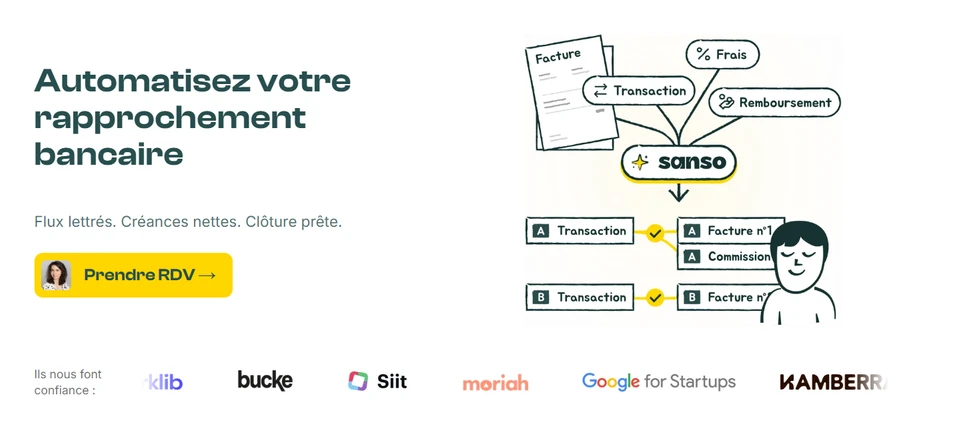
Automating transaction matching saves time, but missing documents and hard-to-identify payments can still keep teams busy.
With Sanso, businesses delegate bank reconciliation to a service that works directly within their existing tools.
The Sanso team handles setup and transaction processing: staff do not need to learn a new platform or configure reconciliation rules. AI agents handle routine transactions, with human support when review is needed.
This service covers a broader range of financial operations: invoice collection, reconciliation, and payment tracking. Sanso automates up to 95% of the financial operations it handles; the remaining 5% are assigned to humans. This rate applies across that scope, rather than to bank reconciliation alone.
Sanso also integrates with Pennylane, allowing small and midsize businesses to delegate this recurring work to a dedicated team. They provide the necessary information or approvals, while Sanso handles matching, research, and exception tracking.
Automate bank reconciliation with Sanso
Delegate reconciliation within your existing tools, with AI agents for routine transactions and human support for exceptions.
Explore Sanso